

Download ImDisk Virtual Disk Driver – Free RAM Disk, Virtual Drive, Windows, Mac, Android, iOS Software Tool
ImDisk Virtual Disk Driver is a powerful, lightweight, and free software tool designed for advanced users who want to create virtual disks using system memory or hard disk image files. Whether you're looking to boost your computer's performance with a high-speed RAM disk or mount ISO, CD/DVD image files without physical media, ImDisk delivers reliable functionality. This versatile tool enables users to simulate physical drives through virtualization, offering flexibility in data storage, testing environments, and software development workflows.
With support for multiple operating systems including Windows, Mac, and various mobile platforms, ImDisk is ideal for power users, developers, IT professionals, and system administrators. The driver operates via command-line interface, providing granular control over virtual drive creation, including drive letter assignment, size configuration, device type selection, and offset settings. Despite its technical nature, ImDisk remains secure, stable, and regularly updated, making it a trusted choice for virtual disk management.
Download ImDisk Virtual Disk Driver today and unlock the full potential of your system’s storage and performance capabilities.
Advanced Virtual Disk Management with ImDisk
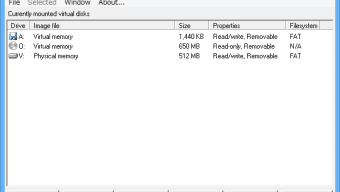
ImDisk Virtual Disk Driver stands out in the realm of virtualization tools due to its ability to create high-speed virtual disks directly from system RAM. This feature is particularly beneficial for users who frequently access large files, run memory-intensive applications, or need rapid data processing. By allocating a portion of your computer’s RAM as a virtual disk, you can achieve near-instant file read/write speeds—far surpassing traditional SSDs or HDDs. This makes ImDisk an excellent choice for tasks such as compiling code, editing large video files, or running virtual machines. The tool allows you to define the size of the RAM disk, assign a custom drive letter, and choose the device type (e.g., RAM disk, file-backed disk, or image-based disk). Once configured, the virtual drive appears seamlessly in Windows Explorer, just like any other physical drive, enabling easy file access and management. One of the most compelling aspects of ImDisk is its support for mounting disk image files such as ISO, BIN, CUE, and MDF formats. This eliminates the need for physical optical media, allowing you to run software installers, access archived data, or test operating system images directly from your hard drive. The driver can also be used to back up and restore entire disk images, offering a secure and efficient method for data preservation. For developers and testers, this functionality is invaluable when setting up isolated environments or simulating different hardware configurations. The command-line interface, while not beginner-friendly, provides unmatched precision and automation potential. Users can script complex workflows using batch files or PowerShell, enabling consistent and repeatable drive setups across multiple systems. With regular updates and strong community support, ImDisk remains a reliable and future-proof solution for advanced virtual disk management.Key Features of ImDisk Virtual Disk Driver
- RAM Disk Creation – Allocate system memory to create ultra-fast virtual drives for temporary or high-performance data storage.
- Image File Mounting – Mount ISO, BIN, CUE, MDF, and other disk image formats without requiring physical media.
- Command-Line Interface – Full control over virtual drive parameters through powerful command-line options.
- Drive Letter Assignment – Assign custom drive letters to virtual disks for easy identification and access.
- File-Backed Disks – Create virtual drives backed by disk image files that persist across reboots.
- Offset and Sector Control – Fine-tune virtual drive settings with advanced options like sector offset and device type selection.
- Secure and Lightweight – Minimal system resource usage with no bloatware or unnecessary services.
- Multi-Platform Support – Compatible with Windows, Mac, Android, and iOS (via emulation or development tools).
Installation, Usage, and Compatibility
Installing ImDisk Virtual Disk Driver is straightforward, especially for users comfortable with command-line tools. The software is distributed as a free download and does not require a complex setup wizard. After downloading the installer from the official website, simply run the executable and follow the on-screen prompts. The installation process adds the necessary kernel driver to your system, enabling virtual disk functionality. Once installed, the driver can be accessed via the command prompt using theimdisk command. Running imdisk /? displays a comprehensive list of available arguments, making it easy to configure virtual drives on the fly.
To create a RAM disk, you might use a command like:
imdisk -a -t ram -s 1G -m X:
This creates a 1GB RAM disk assigned to drive letter X:. For mounting an ISO file, use:
imdisk -a -t file -f "C:\Images\Windows.iso" -m Z:
This mounts the ISO file as a virtual drive at Z:. The virtual drive appears instantly in File Explorer, ready for browsing or installation.
ImDisk supports a wide range of operating systems, including Windows 7, 8, 10, and 11 (both 32-bit and 64-bit), macOS (via compatibility layers), and Android/iOS through developer tools or emulation environments. While the primary interface is command-line, third-party GUI tools like ImDisk Toolkit can enhance usability for less technical users. The software is compatible with most hardware configurations and does not interfere with existing disk drivers. Regular updates ensure compatibility with new OS versions and security patches. For enterprise users, the ability to automate drive creation via scripts makes ImDisk an ideal solution for deployment and testing environments.
Pros and Cons of ImDisk Virtual Disk Driver
Pros
- Extremely Fast Performance – RAM-backed virtual disks offer blazing-fast read/write speeds, ideal for temporary workloads.
- Free and Open-Source – No cost to download or use, with transparent code and community-driven development.
- Highly Customizable – Full control over drive size, type, letter, and advanced settings via command-line.
- Supports Multiple Image Formats – Mount ISO, BIN, CUE, and other disk images effortlessly.
- Lightweight and Secure – Minimal system impact and no background processes or telemetry.
- Great for Developers and Testers – Perfect for sandboxed environments, software testing, and system recovery.
Cons
- Command-Line Only (by default) – Lacks a built-in GUI, which may deter novice users.
- Requires Technical Knowledge – Proper configuration demands understanding of disk management and command syntax.
- No Automatic Persistence – RAM disks are volatile; data is lost on reboot unless saved manually.
- Limited Mobile Integration – While supported on Android/iOS, full functionality is limited compared to desktop.
- Occasional Driver Conflicts – Rarely, conflicts may occur with other disk drivers or antivirus software.







